QUICK GANTT CHART · PRICE AND LICENSE
Gantt chart software for Windows: one-time purchase, no subscription
Quick Gantt Chart is a desktop app for Windows 10 and 11. You buy it once in Microsoft Store for US$29.99. There is no subscription, updates are free, and you can plan and edit projects offline.
This page explains what the purchase includes, how the cost compares with a subscription and with Microsoft Project, and when another tool is the better choice.
What the one-time purchase includes
- One payment. US$29.99 in Microsoft Store (U.S. price, excluding applicable tax). No monthly or annual fee.
- Free updates. New versions are delivered through Microsoft Store at no extra cost.
- Your other Windows PCs. Install the app on another PC by signing in to Microsoft Store with the account used for the purchase, subject to Microsoft Store terms.
- Offline planning. Plan and edit projects without an internet connection. A connection may be needed for Store purchase, installation, updates or license verification.
- Project files you keep. Each schedule is saved as an editable .gnt project file. Share a PDF or PNG with people who do not have the app.
- Refunds through Microsoft Store. Refund requests are handled by Microsoft Store according to its regional policy.
What Gantt chart software costs over three years
A subscription is paid for as long as you use the tool. A one-time purchase is paid once. For one person, the totals look like this:
| Option | How you pay | First year | Three years | Where it runs |
|---|---|---|---|---|
| Quick Gantt Chart | US$29.99 once | US$29.99 | US$29.99 | Windows 10 and 11 desktop; offline planning |
| Online Gantt tool on a subscription Example: GanttPRO Core and Advanced plans | US$7–10 per user per month, billed annually | US$84–120 | US$252–360 | Online, in a web browser and mobile apps |
| Microsoft Project Standard 2024 | US$679.99 once, for one user and one PC | US$679.99 | US$679.99 | Windows desktop |
Prices were read from each vendor’s own pricing page on November 13, 2026: Microsoft Project (opens in a new tab) and GanttPRO (opens in a new tab). Subscription totals are the monthly price multiplied by 12 and by 36. Prices and plans change, so confirm them with the vendor before you decide.
Price is only part of the decision. The next two sections cover what Quick Gantt Chart does and where another tool fits better.
What you can plan with Quick Gantt Chart
Quick Gantt Chart is built for planning client projects and small-team work on a Windows PC.
- Schedule. Tasks, milestones and dependencies, with automatic scheduling and a highlighted critical path.
- Resources and budget. Assign people, equipment and materials, then let Auto Budget Calculation estimate task costs from their rates. See the resource costs example.
- Baselines. Save a plan and compare its dates with the current schedule. See the baseline guide.
- Calendars and views. Set working days and days off, and review the plan in Gantt, Scheduler, Timeline, Agenda or List View.
- Import and export. Bring task lists in from Excel or CSV. Share the chart as a PDF or PNG, and export task data to XLSX, CSV or DOCX. See the Excel import and PDF guide.
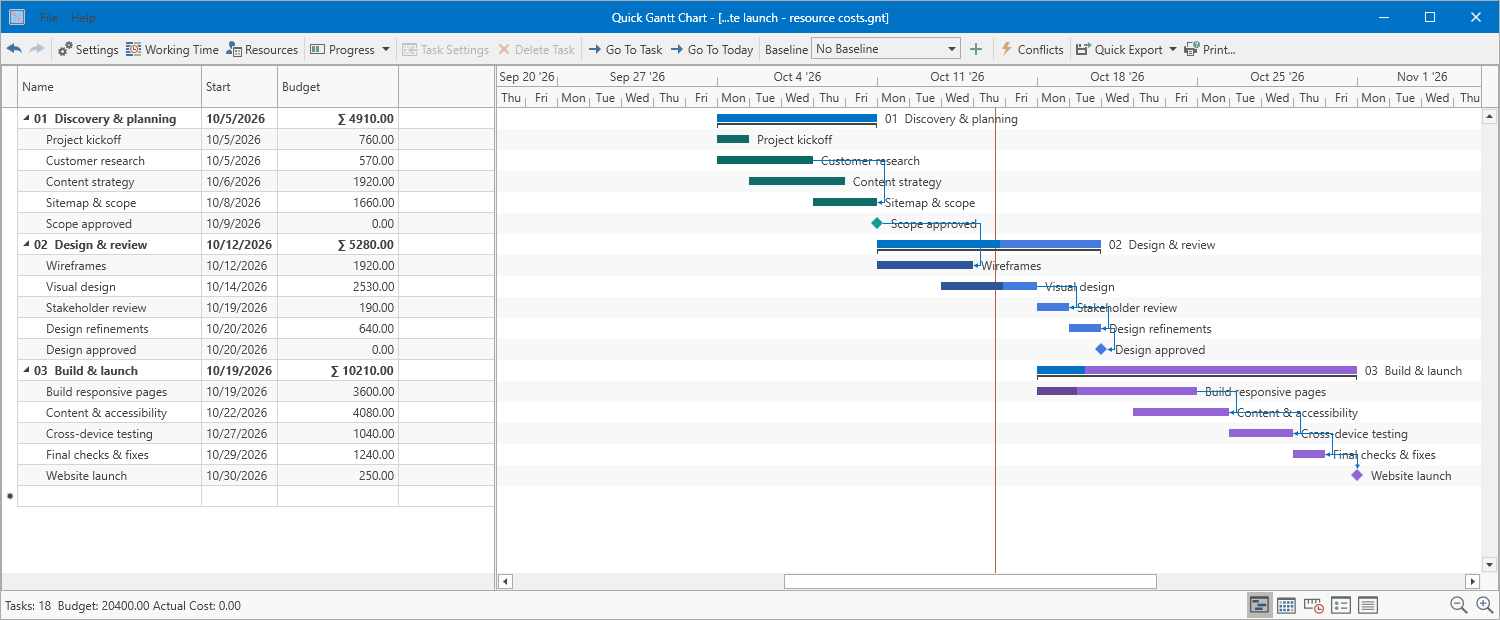
For the full tour, read the Quick Gantt Chart overview.
When Quick Gantt Chart fits, and when it does not
No single tool suits every project. Use this as a quick check before you buy.
A good fit when
- You plan on a Windows 10 or 11 PC.
- You prefer to pay once instead of every month.
- You build the schedule yourself and share it as a PDF or PNG.
- You want planned costs next to the schedule.
- You need to keep working without an internet connection.
Choose another tool when
- Several people must edit the same schedule at once. Quick Gantt Chart shares snapshots, not a live, jointly edited schedule. An online subscription tool is built for that.
- You work on macOS or Linux. Quick Gantt Chart runs on Windows only.
- Your organization standardizes on Microsoft Project. If colleagues and clients expect Microsoft Project files, Microsoft Project is the safer choice.
See it before you buy
You can judge the result without installing anything.
- View a sample PDF schedule (opens in a new tab), exported directly from the app.
- Follow the Excel import and PDF guide or the resource costs example.
- Watch the video tutorials, from the app overview to budgets and costs.
Questions about the license
Is there any recurring fee?
No. Quick Gantt Chart is a one-time payment with free lifetime updates. There are no subscriptions.
Can I use it on more than one PC?
You can install it on other PCs by signing in to Microsoft Store with the account you used for the purchase, subject to Microsoft Store terms.
Does it work without an internet connection?
Yes. You can plan and edit projects offline. An internet connection may be needed for Microsoft Store purchase, installation, updates or license verification.
Is the price the same in every country?
US$29.99 is the U.S. price, excluding applicable tax. Microsoft Store shows the current price for your region before you buy.
What is the refund policy?
Refunds are handled by Microsoft Store according to its regional policy.
More answers are in the Quick Gantt Chart FAQ.
Want the full picture first? Read the overview or browse all Quick Gantt Chart tutorials.